How to Talk to Strangers Online: Your First Five Minutes

TalknMeet TeamBy TalknMeet Team
May 23, 2026
15 min read
How to talk to strangers online—first conversation guide on TalknMeet

Most people do not need another essay on why humans connect. They need a map for the first awkward minute: what to click, what to type, when to stay, when to leave.

This guide owns that slice. It is a practical walkthrough for your first stranger chat online—text-first by default, voice when you are ready—not a repeat of platform history, psychology, or full safety audits.

For the wider picture (text vs voice, 1v1 matching, no signup), see

chat with strangers online. For culture and where stranger chat came from, read talk to strangers online. To try a calm first match in the browser on TalknMeet, open the homepage—no account required.

What “How to Talk to Strangers Online” Means on This Page

Searchers typing “how to talk to strangers online” usually want instructions, not philosophy. They want to know whether to start with text or voice, what to say when the match connects, and how to exit without guilt.

That is the job of this URL. We treat stranger chat as a short, bounded session—not a friendship audition, not a performance for an audience.

If you have never done it before, expect a little friction. The screen loads, you get paired 1v1, and both people wait for the other to move first. You might type “hi,” delete it, type it again—that is normal. That pause is universal. The sections below turn it into a repeatable flow you can use on any privacy-first platform.

The pillar page

talk to strangers covers the big picture—why people do this and how modern matching works. This page zooms in on your first session only.

What This Guide Covers (and What It Skips)

To avoid repeating sibling articles—and to keep Google from seeing five URLs saying the same thing—we draw a hard line:

This page owns

  • First-session steps: open site → match → opener → pace → exit
  • Copy-paste-friendly openers for text and voice
  • When text is the smarter default for beginners
  • When to switch to voice on the same match
  • A short “do not share” list—not a full risk encyclopedia
  • We link out for

  • Text vs voice hub → chat with strangers online
  • Anonymous text privacy → anonymous chat with strangers
  • Speaking out loud mechanics → speak to strangers online
  • Boundaries and comfort → speak to strangers safely online
  • Risk deep dive → is talking to strangers online safe
  • Why it feels good → why people like talking to strangers
  • Think of this URL as the onboarding card in a product—not the entire manual.

    Before You Open a Stranger Chat Site

    Thirty seconds of setup saves five minutes of regret.

    Pick text first unless you already know you want voice

    Text gives you edit time, works in shared rooms, and does not expose accent or background noise on second one. Most first-timers on privacy-first sites type before they unmute.

    If anonymity and “no profile” matter most, read

    anonymous chat with strangers before you start—same flow, more context on identity.

    Set expectations

  • One chat might last two minutes; another might run twenty. Both are fine.
  • You are not failing if the first match is quiet or odd—or if you stare at the empty chat box for ten seconds before sending anything.
  • Leaving is a feature, not rude—built for stranger chat.
  • Environment check

  • Headphones if you might switch to voice later
  • Close tabs with personal info visible on screen share (rare, but good habit)
  • If you are exhausted or upset, text-only may be enough for tonight
  • Step-by-Step: Your First Stranger Chat

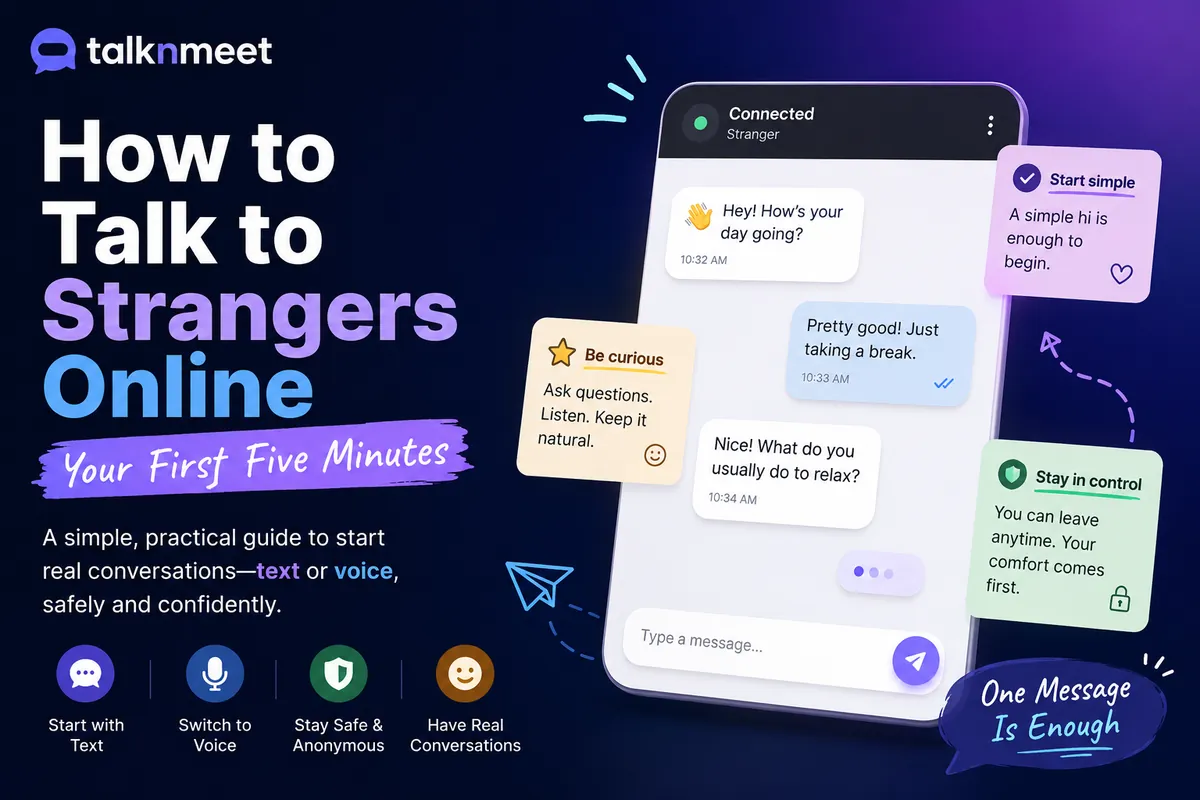
    A typical first session on a 1v1 platform like TalknMeet:

  • Open the homepage in your browser—no signup form on privacy-first sites
  • Choose text chat (or accept the default text match)
  • Wait a few seconds while the system pairs you with another visitor—then wait again while you decide what to say
  • Send one short opener—you go first; waiting in silence rarely helps either person, and the other side is often just as unsure
  • Ask one easy question; let them answer before you stack three more
  • If the rhythm feels okay after a few exchanges, stay; if not, thank them and leave
  • Optional: switch to voice on the same match when text already feels human
  • That is the whole loop. No friend request, no follow-up obligation, no profile to maintain.

    For modality choices (public room vs 1v1, voice-first sites), use the decision map on

    chat with strangers online—this page assumes you already picked a calm 1v1 site.

    Openers That Actually Work

    Good openers are short, neutral, and easy to answer. Avoid “hey beautiful” or instant deep confessions. If you rewrite the same line twice wondering whether it sounds awkward—that is fine. Send the simpler version.

    Text openers

  • “Hey—how’s your evening going?”
  • “First time on here tonight. You?”
  • “Just wanted a quiet chat for a few minutes—what brought you on?”
  • “Random question: what are you listening to lately?”
  • Voice openers (when you unmute)

  • “Hi—can you hear me okay?”
  • “Hey, I’m [nickname if you use one]—where are you calling from tonight?”
  • “I’ll keep it short—long day. How’s yours?”
  • Notice none of these demand intimacy. They invite a reply. If they answer with one word, ask something slightly more specific—not “tell me your life story.”

    Once you are speaking out loud, tone and pacing matter more than clever lines—see

    speak to strangers online for the first ten seconds of voice.

    If Talking to Strangers Makes You Nervous

    Nervous is the default for a lot of first-timers—not a sign you picked the wrong hobby. A few habits keep the nerves manageable without turning the chat into a performance.

  • Start with text. You get a backspace key and no one hears your voice shake on “hello.”
  • Keep early chats short. Five minutes counts. You do not need an hour to call it a success.
  • Do not force depth. Small talk about weather, shows, or “how’s your week” is enough.
  • Leave when you feel done—tired, overstimulated, or just not into it. No debrief required.
  • Treat the first three sessions as practice reps, not tests. Match three is often easier than match one because you already know the buttons.
  • You are not trying to become a different person. You are learning that a stranger on the internet can reply kindly to a plain “hey”—and that you can close the tab if they do not.

    The First Five Minutes

    After the opener, most good stranger chats follow a loose pattern:

  • Minute 1: greetings and light context (time zone, weather, “busy day”)
  • Minutes 2–3: one shared topic—work stress, a show, gaming, college, travel
  • Minutes 4–5: either depth (if both lean in) or a polite wind-down
  • Topics that work for strangers: hobbies, music, “what’s your city like,” language practice, mild venting about a generic bad day. Topics to save until trust builds: full name, workplace, relationship drama with identifying details.

    Match their energy. If they send two-word replies, keep questions light. If they open up, you can go a layer deeper—still without swapping contact info in minute three.

    That moment when they reply with more than one word and the thread finally moves—most people feel a small relief there. Often the other person was waiting for you too, just as unsure about the first line.

    Curious why stranger chat feels relieving at all? That is psychology, not mechanics—read

    why people like talking to strangers when you want the “why,” not the “how.”

    What to Do When the Conversation Stalls

    Every stranger chat hits a lull: one-word answers, a topic that died, or thirty seconds where neither person types. That does not always mean “bad match”—sometimes both people are thinking of what to say next.

    Restart momentum gently

    Acknowledge the stall without making it weird: “I’m bad at openers—what’s keeping you up tonight?” or “We got quiet—want to switch topics?” One honest line often unlocks the chat again.

    Simple follow-ups that work

  • They mentioned work → “Rough day or just long?”
  • They said they’re bored → “Same—scrolling stopped working. Watching anything good?”
  • They named a city → “Never been—what’s it like this time of year?”
  • Pick up one detail they already gave you. It shows you were listening without launching a questionnaire.

    Topic transitions (not interrogations)

    Bad pattern: “Where are you from? What do you do? How old are you? Single?” in four lines. That feels like an interview, not a chat.

    Better pattern: comment, then one question. “That show’s overrated honestly—what do you watch when you want something light?” Bridge from what they said instead of jumping to a new form field.

    When to let it end naturally

    If you tried two light pivots and replies stay flat—“k,” “idk,” nothing back for a minute—it is okay to wind down. “Gonna hop off—nice meeting you” beats forcing another twenty minutes of silence. Some chats are simply done at minute four, and that is a complete conversation.

    When to Switch From Text to Voice

    You do not owe anyone your voice. Switch when text already proved the match is human and you want warmth without turning on a camera.

    Good signals to try voice on the same match:

  • Replies are friendly and paced—not one-word dismissals
  • You are in a private enough space for audio
  • The topic would flow faster spoken (storytelling, language practice)
  • Ask in text first: “Want to try voice for a minute?” Many people hover over send for a few seconds before that message goes out—that is normal. If they decline, stay in text or leave—no pressure.

    For anonymous voice without video, read

    anonymous voice chat. For spontaneous audio matching from the start, see random voice chat when you are ready to skip typing entirely.

    When to Leave or Hit “Next”

    Leaving is normal. Stranger chat is designed for short arcs.

    Leave without drama when:

  • The other person is rude, sexual without consent, or pushing for personal data
  • You are bored and gave it a fair two or three exchanges
  • You feel tired, anxious, or simply “done”
  • The conversation reached a natural end
  • Polite exit lines: “Nice chatting—gonna head out.” / “Gotta run, take care.” / “Not feeling this one—good luck tonight.” No essay required. A little guilt about leaving is common; the platform built “next” for a reason.

    For boundaries, comfort scripts, and red flags in more detail, use

    speak to strangers safely online and is talking to strangers online safe.

    What Not to Share With Strangers

    A short list beats a lecture. Keep these off the table in a first session:

  • Full name, home address, school or workplace name
  • Phone number, email, or social handles “to continue on WhatsApp”
  • Photos of ID, documents, or anything financial
  • Exact location (live pin, “I’m at this café on X street”)
  • Passwords, verification codes, or “prove you are real” requests
  • If someone pressures you to move platforms quickly, that is a signal to leave—not to comply.

    This page is not a substitute for a full safety guide. When you want risks, scams, and platform design explained, read

    is talking to strangers online safe end to end.

    Awkward Moments Are Normal

    Silence after “hi.” A joke that lands flat. You forget what you were saying mid-sentence. You watch the “typing…” indicator appear and disappear. All of it happens on voice and text.

    Treat awkwardness as data, not failure. If the vibe recovers in one message, stay—you will often notice the other person relax once you send something ordinary. If you are both stuck in polite nothingness after five minutes, thank them and try another match.

    First sessions are practice. The second and third feel lighter because you already know you can leave.

    When you want conversation quality after the basics—listening, pacing, keeping talk alive—see

    voice chat with strangers.

    Where to Go Next in the Guide Cluster

    After your first chat, deepen one lane instead of re-reading this page:

  • Modality & 1v1 matching → chat with strangers online
  • Text privacy & no profile → anonymous chat with strangers
  • Culture & platforms → talk to strangers online
  • Out-loud mechanics → speak to strangers online
  • Boundaries → speak to strangers safely online
  • The product entry point for all of the above is still

    TalknMeet—text and voice on one match, no signup.

    How TalknMeet Fits a First Session

    TalknMeet is built for the flow this guide describes: open the site, get matched 1v1, start in text, optionally move to voice on the same stranger—no account wall, no public room chaos.

  • Text-first lowers the bar for first-timers
  • One-to-one focus keeps the conversation private
  • Instant leave / next when a match is not right
  • Voice without camera when you are ready for tone, not visuals
  • We are not promising every match will be profound. We are offering a calm place to practice the steps above until talking to strangers online feels like a normal option—not a stunt.

    Frequently Asked Questions

    Start with text unless you already know you want voice. Text lets you think, edit, and exit quietly. Switch to voice on the same match once the exchange feels human. For a full text-vs-voice map, see

    chat with strangers online.

    Yes—on most 1v1 platforms, including

    TalknMeet, you stay on the same match and switch when text already feels comfortable. Ask in text first (“Want to try voice for a minute?”); if they agree, unmute. If not, stay in text or leave. For the full when-and-how, see the speak to strangers online guide for your first moments out loud.

    Keep it short and answerable: a greeting plus one light question (“How’s your evening?” or “First time on here tonight?”). Avoid heavy personal dumps or flirtation in line one. You go first—waiting in silence rarely helps either person.

    Yes. Stranger chat is opt-in and opt-out. If someone is rude, pushy, or simply not your vibe after a fair try, leave. A one-line “gotta run, take care” is polite; no explanation is required if you feel unsafe.

    Not on privacy-first platforms. Sites like

    TalknMeet let you match in the browser without an account. Fewer steps mean you are more likely to actually start instead of abandoning at a signup form.

    Use 1v1 spaces with clear exits, keep personal details private, and leave uncomfortable chats. This page lists what not to share; for risks, scams, and platform design, read

    is talking to strangers online safe and speak to strangers safely online.

    One Message Is Enough for Tonight

    You do not need a witty opener or a conversation that changes your life. Open TalknMeet, get matched, and send one plain line—even "hey." If they reply, see where five minutes go. If not, or if it feels off, close the tab. That small step still counts.